
Control and reduce your restaurant's waste with data
Log every loss. Understand why money is being wasted.
Between 4% and 10% of the food that enters a kitchen never reaches the customer's plate. Expiry, portioning errors, unregistered internal consumption, breakages: waste is the least visible gap in the profit and loss account. Kitchen Stocker makes it visible, measurable and, above all, reducible.
What's included
- Quick logging from mobile or tablet
- Configurable reasons set by your team
- Impact on food cost calculated instantly
- Reports by product, shift and category
- Comparison across locations
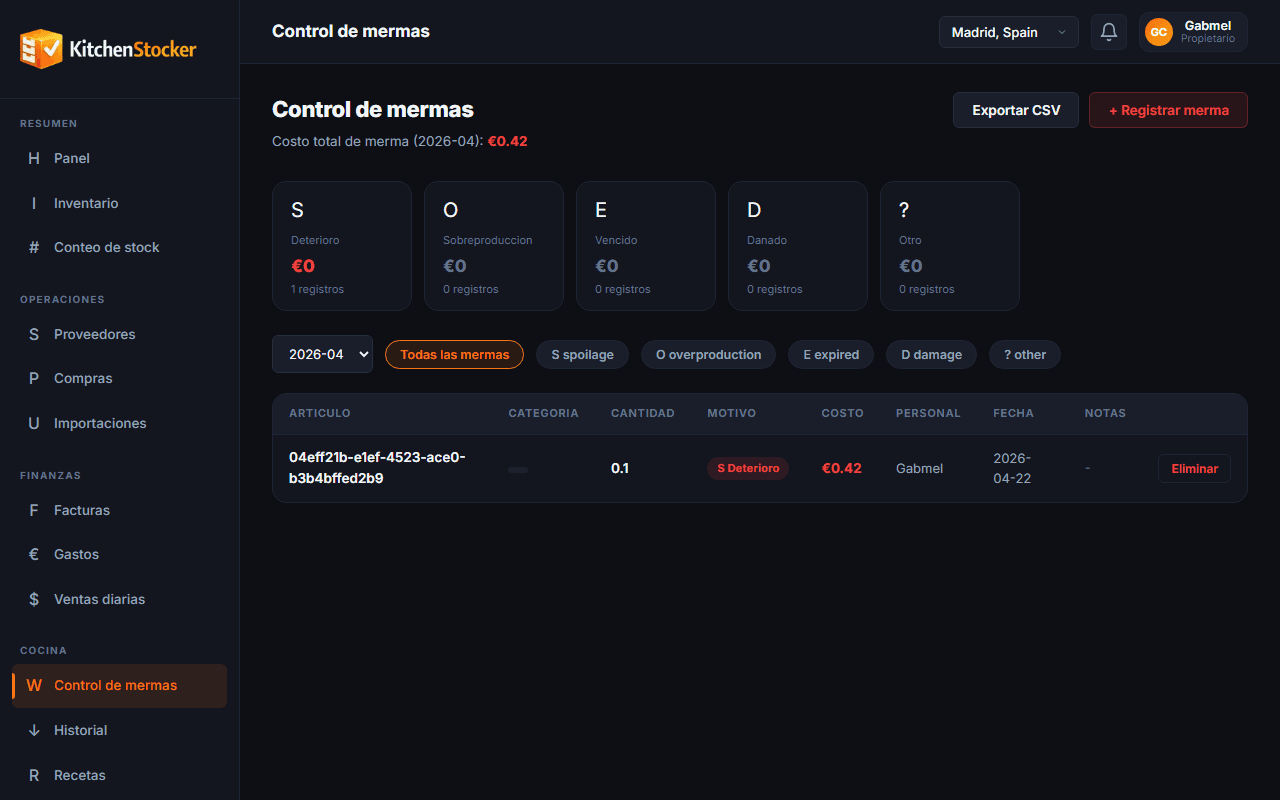
Waste Control · app.kitchenstocker.com
How it works
Configure waste reasons
Define the causes that apply to your operation: expiry, breakage, portioning error, staff consumption, return. You can add custom reasons.
Log the loss in the moment
The shift manager opens the app, selects the product, quantity and reason. Logging takes less than 20 seconds and requires no paper.
Stock and food cost update automatically
Kitchen Stocker deducts the units from inventory and calculates the financial impact of each waste entry at the product's cost price.
Analyse the reports and act
Reports group waste by product, shift, responsible person and cause. With that information you can change procedures, adjust orders or review recipe cost cards.
Who is this module for?
Head chef
Identifies which products are lost most often during their shift and takes action: adjust portions, improve FIFO or review storage conditions.
Owner
Compares waste across locations and spots which one has an operational problem that sales data alone doesn't reveal.
Operations director
Quantifies the total cost of waste for the month and presents it as a percentage of raw material cost — an actionable KPI for the team.
Frequently asked questions
Does waste control affect inventory automatically?
Yes. Every logged waste entry deducts units from stock in real time. No additional manual adjustment is needed.
Can I view waste by shift or by employee?
Yes. Reports can be filtered by shift, the person who logged the entry, product category and date range.
How is the financial impact of waste calculated?
Kitchen Stocker uses the product's cost price at the time of logging. If the price has varied during the month, the calculation reflects the price in effect at each loss.
Can I compare waste levels across different locations?
Yes. The multi-location panel consolidates waste from all establishments and lets you compare percentages of total consumption to identify which location has the biggest problem.
Other Kitchen Stocker modules
Start free with Waste Control
No credit card. No installation. Cancel anytime.